AI tools like ChatGPT, Claude, Gemini, and Copilot have quickly become one of the fastest-adopted technologies in history.
In March 2025, a survey by Elon University estimated that 52% of U.S. adults (or consumers) now use LLMs like the ones above. And on the business side, Hostinger claims that by the end of 2025, nearly 70% of U.S. orgs will use LLMs to some degree.
Not to mention the not-so-subtle signs that ChatGPT could be showing ads in-platform sometime soon. Which might just make it the most powerful ad platform to not yet exist.
Either way, whether you’re B2B or B2C, you’ll need a way to report on AI referral traffic so that you know where you stand in this new pocket of search.
Skip Ahead:
At a Glance
- Traffic is Already Here: Websites are seeing a steady rise in referral traffic from AI platforms like ChatGPT and Perplexity.ai, often landing on homepages, service pages, and long-tail blog content
- GA4 is Key for Tracking: Google Search Console bundles AI Overview clicks with organic search, but Google Analytics 4 (GA4) is the best tool to isolate and report on this new AI referral traffic
- Simple Setup: You can build a custom report in GA4 or a live dashboard in Looker Studio to track AI traffic in under 20 minutes using a provided regex filter.
- Strategic Imperative: Tracking this traffic is key for understanding shifting user behavior and optimizing content for visibility beyond traditional search engines
- *The Pitfall of Pricey AI Tools: Plenty of AI visibility tools like Profound and Athena are great for larger orgs with massive amounts of AI traffic to track, drill into, and optimize for. But for SMBs or smaller outfits, these tools simply aren’t worth the hype and price. By using GA4 and Looker Studio, you’ll have the data you need to know which pages to focus on, refresh and promote.
Are You Seeing AI Traffic Yet?
If you’ve noticed a spike in referral traffic from domains like chat.openai.com or perplexity.ai when you check reports in GA4, you’re not alone. I manage the SEO, PPC and content strategy at a consulting firm in San Diego, and we’ve seen a steady rise in visits from AI platforms — often landing on our home page, service pages, or long-tail content/niche blog posts.
Unfortunately, traffic from Google’s AI Overviews is still hard to isolate without some work on your end. In Search Console, it’s bundled with standard search data, making it tricky to measure directly. Which is why GA4 is your best bet for clarity.
What’s the Point of Segmenting LLM Traffic?
There’s an ongoing debate in SEO circles: should LLMs be treated like search engines? Technically, they’re not—but functionally, they’re guiding users to content in ways that look a lot like search.
What’s not up for debate is the shift in user behavior. People are discovering content through AI chats, voice assistants, and hybrid tools that blend search, conversation, and recommendation. Whether it’s Meta AI, TikTok search, or a chatbot embedded in a browser, the way users find and engage with information is changing fast.
Your SEO strategy needs to reflect that. Segmenting LLM traffic helps you understand what content resonates in these new environments—and how to optimize for visibility beyond traditional search.
There are two ways you can go about reporting on AI referral traffic to your site:
- GA4 exploration reports: If you haven’t used the Explore tab in GA4 yet, this is where you can build custom reports for funnel exploration, visitor journeys, and more. It’s how you see what users are doing once they land on your site. It’s extremely valuable when reporting to clients, stakeholders, leadership, and finding your “money” pages.
- Looker Studio dashboards: Looker Studio lets you turn GA4 data into custom, interactive dashboards and live reports. You get full control over how data is displayed and what numbers matter most. The biggest benefit is how Looker eliminates weekly or monthly data gathering for reporting. Just add a date selector and send the link to clients, stakeholders, leadership, etc. for them to review at their own pace.
Both are worth building, and both will take you less than 20 minutes to set up.
How to Track AI Referral Traffic with GA4 Exploration Reports
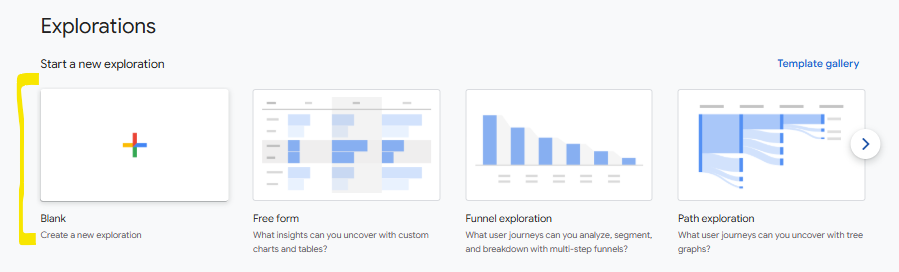
First, click the Explorations tab on the left side panel in GA4 and create a new Blank Report.
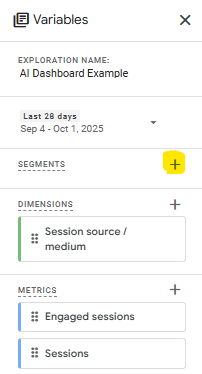
Click the + sign next so Segments, then you’ll move onto setting the condition.
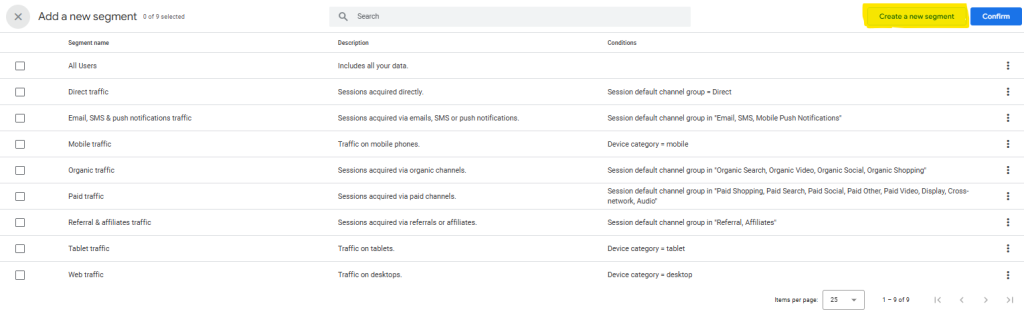
Click Create New Segment, select Session Segment, and then paste the following regex as a filter:
^.*ai|.*\.openai.*|.*copilot.*|.*chatgpt.*|.*gemini.*|.*gpt.*|.*neeva.*|.*writesonic.*|.*nimble.*|.*outrider.*|.*perplexity.*|.*google.*bard.*|.*bard.*google.*|.*bard.*|.*edgeservices.*|.*astastic.*|.*copy.ai.*|.*bnngpt.*|.*gemini.*google.*$
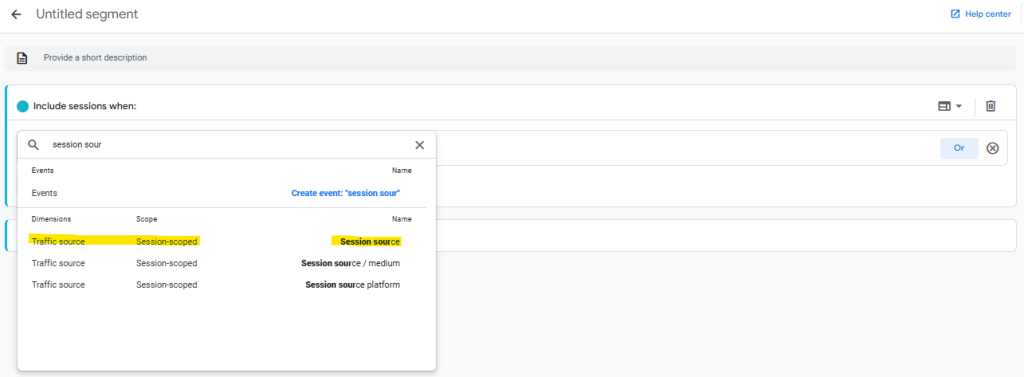
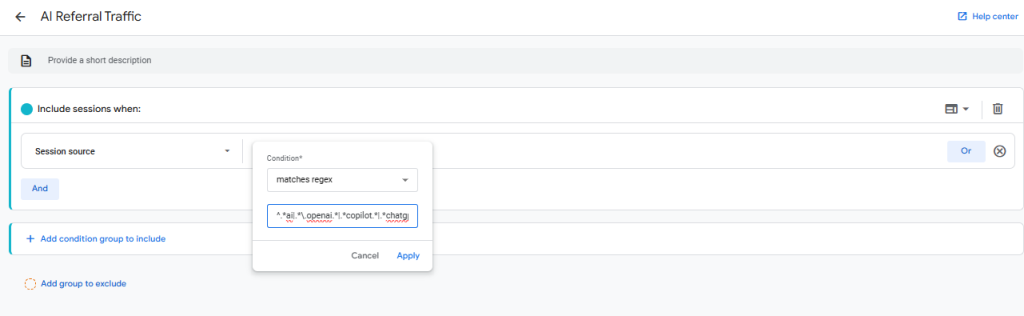
Click Apply to save the segment.
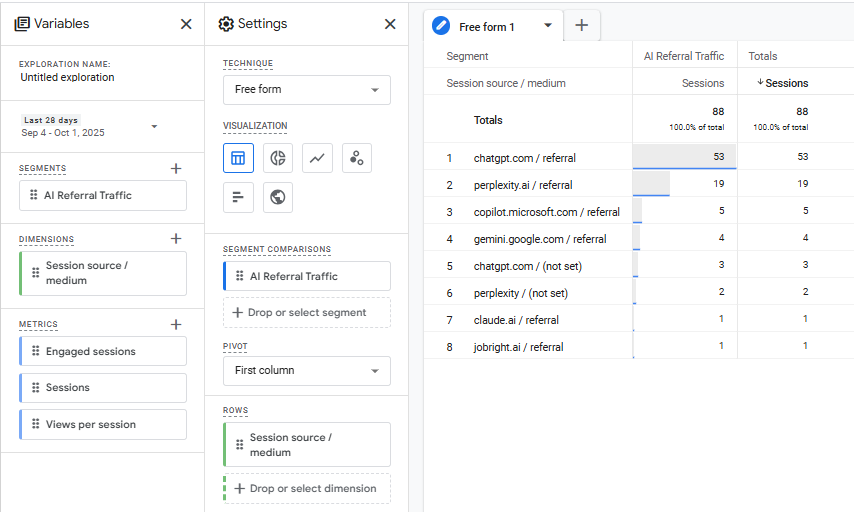
With Sessions set as your Values, you should see a table like this:
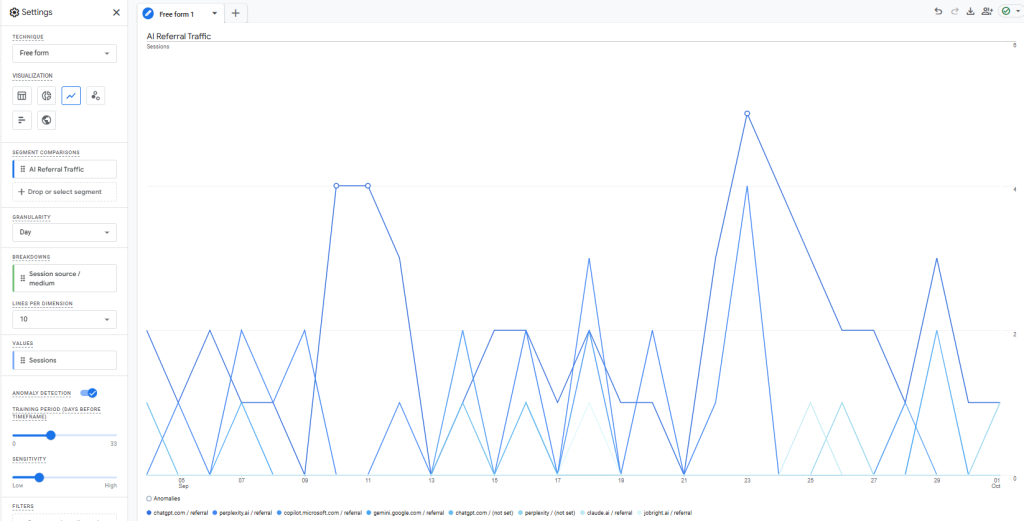
For a view of your AI referral traffic over time and on specific days, click the Line chart visualization option:
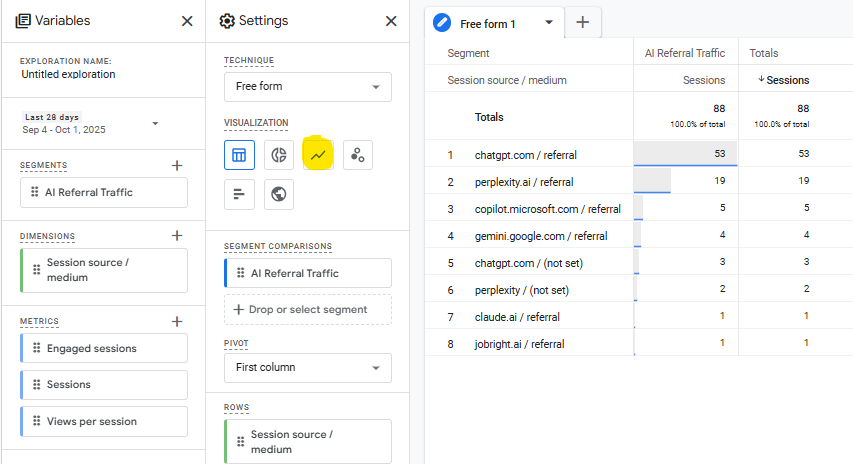
And you should see something like this:
How to Track AI Referral Traffic in Looker Studio
Looker Studio is my preferred method for AI traffic reporting.
You can create a live dashboard, which means no more weekly or monthly data gathering. Just send the dashboard link to your client(s) or higher-ups and they can use a date range selector as needed.
But before you can do this, you need to create a new Channel Group in GA4.
Here are the preemptive steps:
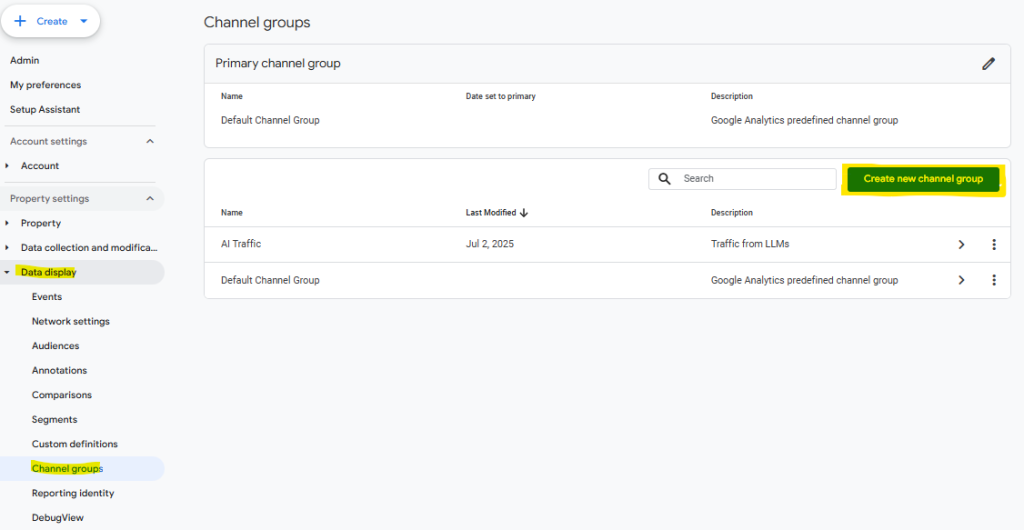
In the GA4 Admin Panel, go to Data Display -> Channel groups and click Create New Channel Group.
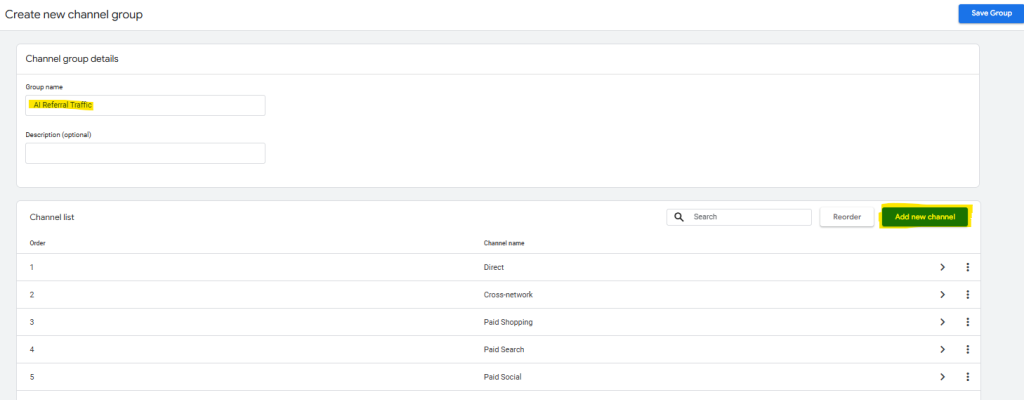
Next, add a name for the group and click Add Channel.
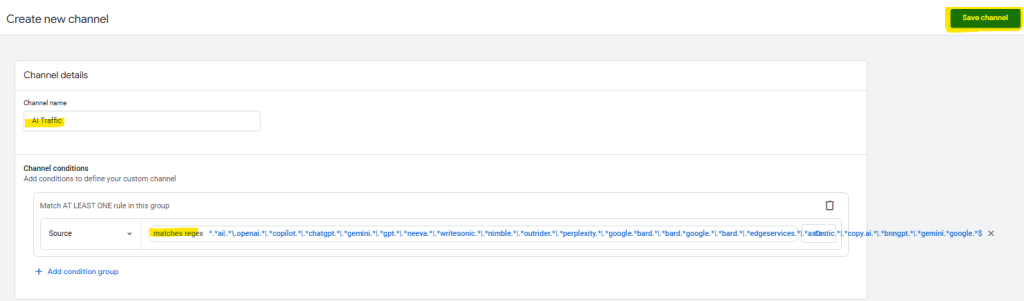
Then add a name for the channel, e.g. “AI Traffic,” and add the same regex details as you did earlier for the AI Traffic segment.
Click Save Channel.
Lastly, we recommend dragging/reordering your channel list so that your new “AI Traffic” group is at the top.
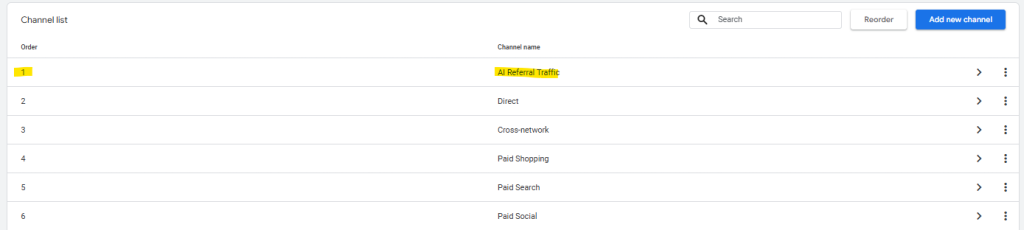
Now that this is all set up, you can head to Looker Studio and use your new AI Traffic channel grouping to filter your data.
In Looker Studio…
- Create a new blank report
- Connect to your GA4 data stream
- Add a filter and select your AI Traffic channel
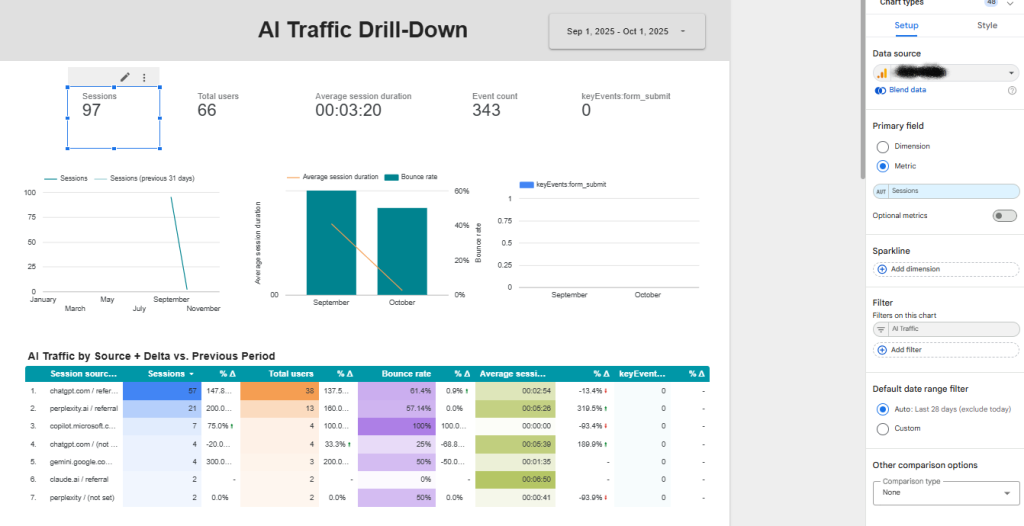
- Insert elements like:
- Logo, Title
- Date Range Selector
- Sessions
- Total Users
- Average Session Duration
- Event Count
- Conversions/Key Events
- Charts to visualize sessions, session duration etc.
- Comparison table of AI traffic vs. previous period
- Get creative with it!
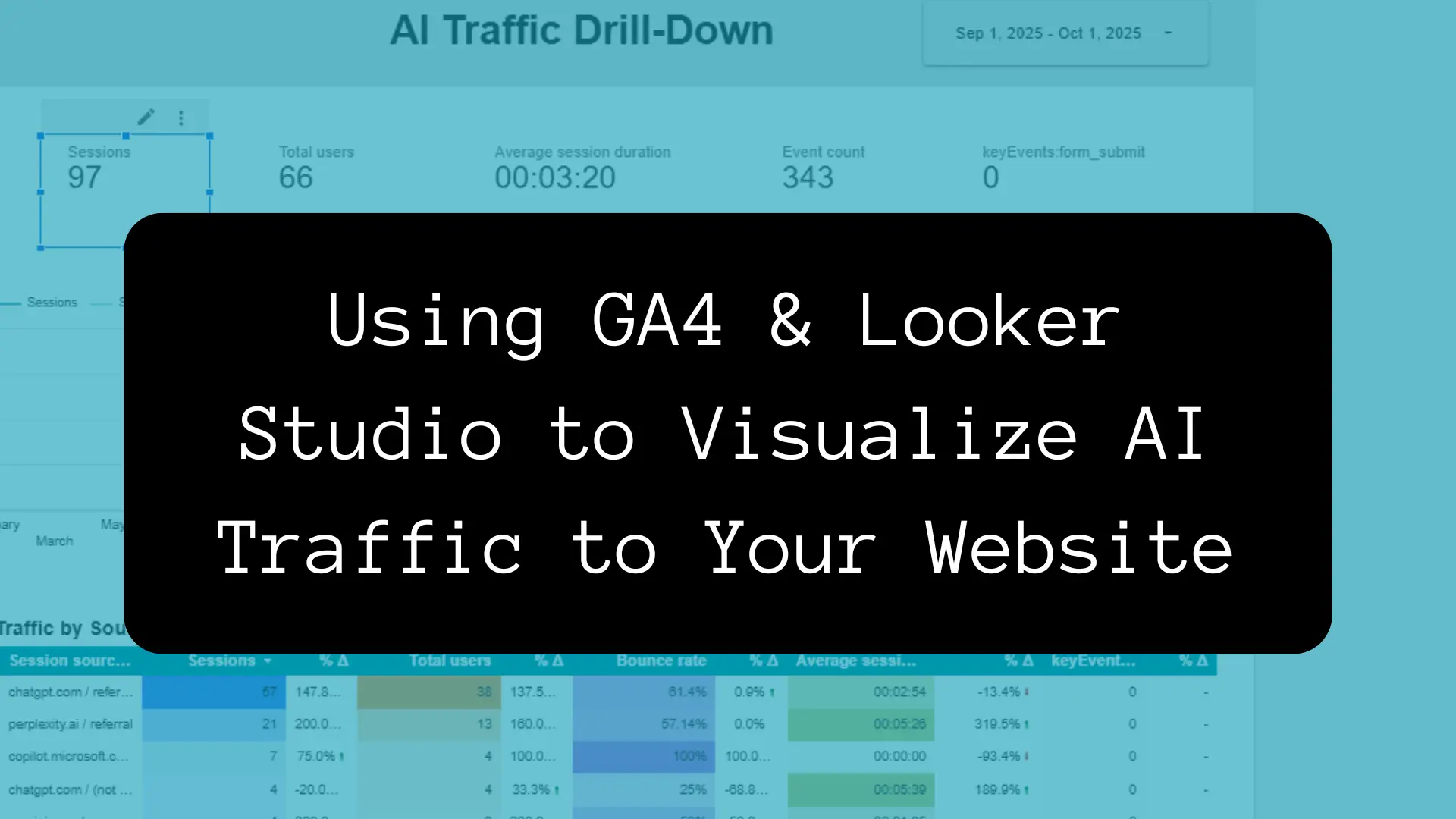
Here’s what it might look like:
Identifying Pages Receiving AI Traffic
One last note: now that you have your new AI segment and channel group, you can see which pages are receiving that AI traffic.
Here are the steps:
- GA4 → Explore → Blank Exploration
- Add your AI Traffic segment
- Add the dimension: Page path + query string or Page title
- Now add these metrics:
- Sessions
- Engaged Sessions
- Conversions (if you have it set up)
- Set the visualization to Table or Bar chart
This should show you a list of pages that AI-referred users are landing on, along with some engagement and conversion metrics.
Or in your Pages/Screens report, add a filter and select your AI grouping, then add another element to the right of Page Path and select Source/Medium. This will show you 1. Pages receiving AI referral traffic and 2. Which LLMs are sending that traffic.
Great materials to show clients or leadership.
You can also do this in Looker Studio if you add a table or chart showing the Page Path or Page Title, with Sessions, Engagement rate, and Conversions as the metrics.
Closing Thoughts
For SMBs especially, this GA4 and Looker Studio setup offers a practical, cost-free way to track AI-driven traffic and optimize content accordingly. While it doesn’t measure brand visibility inside LLMs like Athena or Profound, it gives you real data on what’s working — without the guesswork or the price tag. Those are enterprise tools, after all.
How Do AI Visibility Tools Work?
Platforms like Athena and Profound work by submitting millions of synthetic prompts to AI engines daily (not the most environmentally conscious thing) and then analyzing which brands, or users, show up in relevant responses.
My GEO vs. SEO Rant
This creates a broad, rough view of AI search visibility across tools like ChatGPT, Claude, and Perplexity. The thing is, the data is inherently approximate. Browser privacy, personalization, and prompt variability get in the way of a full picture. So the results are skewed.
These tools are pretty slick with all the content optimization features they have, which are supposed to help boost your likelihood of being mentioned by LLMs.
The only caveat to that is, many of those strategies are reliant on traditional on-page SEO. You’ll end up doing a bunch of things you should’ve already been doing.
So for now I’m not sold on those tools, I guess unless I were managing SEO for a massive brand. So maybe I’m just bitter.
If anything, AI workflow automation tools like n8n are what marketing/SEO teams should be looking at right now.
But that’s for another article.
FAQs
While traffic from Google’s own AI Overviews is bundled with organic search in Search Console, you can isolate visits from other AI platforms like ChatGPT and Perplexity in GA4. The most effective method is to create a custom segment or channel group using a specific regex filter to capture referrals from known AI domains.
You are likely receiving referral traffic from ChatGPT when users share a link to your website within a conversation or when the AI platform cites your content as a source in its response. This often happens for informative, long-tail blog posts or authoritative service pages that the LLM deems a relevant answer to a user’s query.
Yes, adapting your strategy is becoming essential. Rather than traditional “AI SEO,” focus on creating high-quality, authoritative content that directly answers user questions. Segmenting your AI referral traffic will help you understand what content resonates in these new environments, allowing you to optimize for E-E-A-T (Experience, Expertise, Authoritativeness, Trustworthiness).
You can use the following regex pattern to create a segment or channel group in GA4 to track traffic from a wide range of AI platforms: ^.*ai|.*\.openai.*|.*copilot.*|.*chatgpt.*|.*gemini.*|.*gpt.*|.*perplexity.* This captures domains from major players like OpenAI, Google Gemini, and Microsoft Copilot. Keep in mind that this will evolve as more AI tools enter the market.
GA4 Exploration Reports are ideal for deep, custom analysis of user behavior after they arrive from an AI platform. Looker Studio is better for automated, high-level reporting, creating a shareable live dashboard that eliminates manual data gathering for clients or stakeholders. For a complete picture, it’s recommended to set up both.